

When Apple unveiled its latest software updates at its Worldwide Developers Conference (WWDC), much of the spotlight fell on Siri's upcoming artificial intelligence transformation. However, the most practical benefits of Apple's AI strategy may actually come from a collection of smaller features quietly integrated throughout iOS 27.

Instead of requiring users to interact with a chatbot-like assistant for every task, Apple is embedding AI directly into the apps and services people already use every day. The goal is simple; make the iPhone smarter, more helpful, and less demanding of users' time.
From splitting restaurant bills to managing passwords and organizing browser tabs, iOS 27 introduces several AI-powered tools designed to simplify everyday activities. Here are some of the standout features arriving later this year.
Smarter Bill Splitting with Apple Cash
Paying for group dinners can often become a hassle, especially when everyone orders different items. With iOS 27, Apple Intelligence will make splitting restaurant bills significantly easier.

Users can take a photo of a receipt or upload an existing image, and the system will automatically identify items, quantities, taxes, tips, and totals. Each person can select the items they ordered, including shared portions of meals, and Apple Cash will handle the payment requests directly through Messages.
Rather than manually calculating everyone's share, the feature automatically distributes taxes and tips fairly, helping groups settle expenses quickly and accurately.
AI-Powered Password Upgrades
Creating strong passwords is no longer enough in a world where data breaches occur regularly. Even secure passwords can be exposed when companies suffer security incidents.
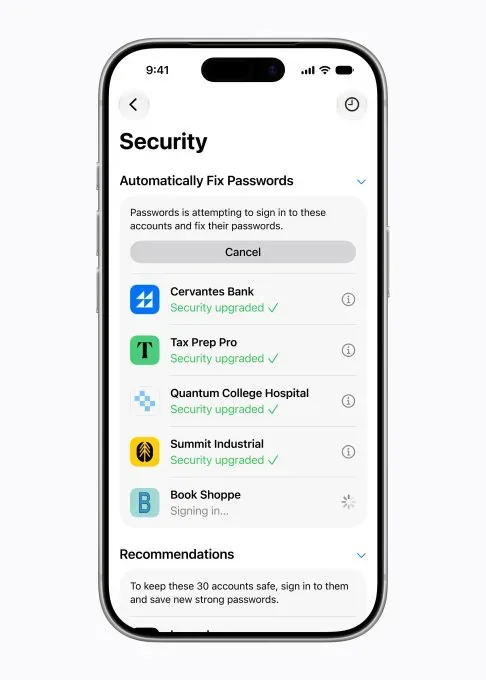
To address this challenge, iOS 27 introduces an intelligent password update feature. Apple's AI can detect weak or compromised passwords and assist users in replacing them with stronger alternatives.
The process is designed to work automatically by securely navigating supported websites, signing users in, and updating credentials without requiring extensive manual effort. This could dramatically improve online security for millions of users.
Helpful One-Tap Suggestions in Messages
Apple is bringing more intelligence to the Messages app with contextual suggestions that appear when they're needed most.

For example, if someone asks you to remember an errand, your iPhone may suggest creating a reminder with a single tap. If a friend requests photos from a recent event, the system can identify relevant images and offer them for quick sharing.
Planning a dinner, meeting, or outing? Messages can also suggest adding the event directly to your Calendar. These recommendations appear naturally within conversations, helping users take action without interrupting their workflow.
Easier Customer Service Calls
Customer support calls often require account numbers, booking references, or confirmation codes that are difficult to locate while speaking with a representative.

With the new Call Context feature, Apple Intelligence can automatically surface relevant information during a phone call. If you're contacting an airline, for example, your reservation details may appear directly on-screen.
The information is retrieved from sources such as Mail while remaining on-device, ensuring privacy and security. Instead of searching through emails during a call, users will have important details ready when needed.
Creating Calendar Events Using Natural Language
Adding appointments to a calendar is becoming more intuitive in iOS 27.
Users can simply describe an event in everyday language, and Apple Intelligence will extract dates, times, locations, and contacts automatically. The system then creates a calendar entry with minimal input required.
This approach removes much of the manual data entry traditionally associated with scheduling events.
AI Makes Shortcuts More Accessible
The Shortcuts app has long been one of the most powerful tools on the iPhone, but many users found it difficult to learn.
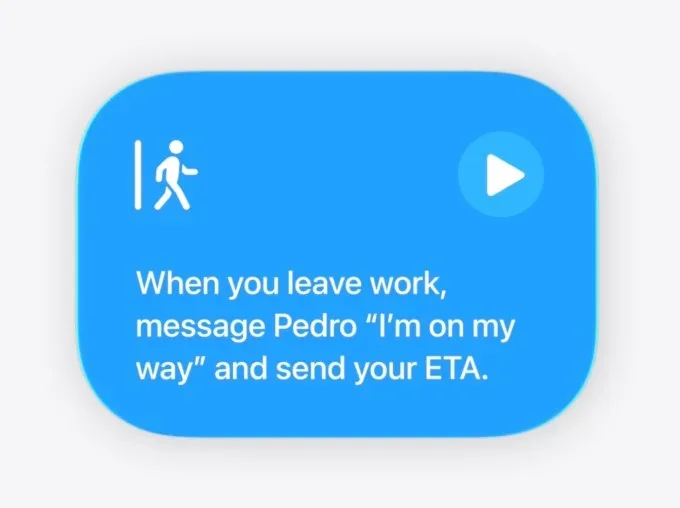
iOS 27 changes that by allowing users to describe automations in plain language. Instead of building workflows step by step, users can simply explain what they want their device to do.
Examples include sending an ETA message when leaving work, automatically opening specific productivity apps, or adjusting alarms based on the next day's calendar schedule.
By lowering the technical barrier, Apple is making automation accessible to a much wider audience.
Fewer Notifications from Smart Home Devices
Smart home systems generate a large number of notifications, many of which relate to a single event.
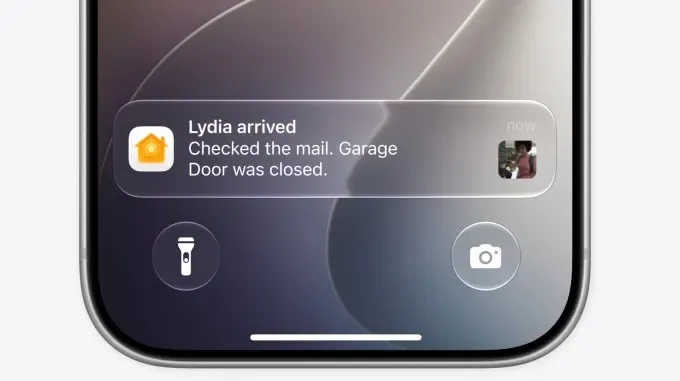
Apple Intelligence can now recognize when multiple actions are connected. Rather than sending separate alerts for opening a garage door, checking the mailbox, and entering the house, the Home app can combine them into a single notification indicating that someone has arrived home.
The Home app will also use AI-powered search to help users quickly locate important video clips, such as package deliveries or security events.
Automatic Tab Organization in Safari
Anyone who frequently keeps dozens of browser tabs open will appreciate Safari's new AI-powered organization tools.
Apple Intelligence can analyze browsing activity and group related tabs together automatically. Researching a vacation, for instance, could result in travel-related tabs being organized into a dedicated group for easy access later.
The feature helps reduce browser clutter while making ongoing projects easier to manage.
Apple's Bigger AI Vision
While Siri's evolution may capture headlines, Apple's broader strategy is becoming increasingly clear. Rather than positioning AI as a separate destination, the company is embedding intelligence throughout the iPhone experience.
The result is software that quietly assists users behind the scenes, reducing repetitive tasks and making everyday interactions more efficient. For many iPhone owners, these practical improvements may end up being more valuable than any single AI assistant feature.
As iOS 27 approaches its public release, Apple's focus appears less centered on flashy AI demonstrations and more focused on solving real-world problems that users encounter every day.